Motivation
From time to time I really need linux server with fresh public IP address without any firewall rules in any direction.
Once I need to upload/download something via SFTP/SCP.
Then I need to scan something and want be sure, that my ISP doesn’t block some communication for good reasons…
It should be fresh, raw, unfiltered, isolated, temporary virtual machine in a wild internet.
And as usually I want it quick and without any mental overhead:)
Security disclaimer
This setup is intentionally insecure by design. Never reuse these patterns for production or long-running servers. Use freely, if you know what you are doing;) Do not forget always to destroy VM after use
SecureCRT integration
I’ve already wrote about using SecureCRT as my personal automation controller in my previous post, so without repeating myself:
- I have a buttons “Start SCP” and “Destroy SCP” in SecureCRT
- Each button has calls its “controller” python script
- “controller” script then call my executive python script (inside its venv and with its libraries)
Controller script is very simple. It just open new terminal and call my executive script:
import subprocess
import os

cmd = "/Users/stefanbezo/Documents/Dev/SCRT_2025/.venv/bin/python /Users/stefanbezo/Documents/Dev/SCRT_2025/SCP/init_scp_tf.py"

osascript_command = f'''
tell application "Terminal"
    activate
    do script "{cmd}"
end tell
'''

subprocess.Popen(["osascript", "-e", osascript_command])
Main executive python script
Executive script is much more interesting. But first structure of folder where scripts are placed.
📁 SCP
├── 📄 .gitignore
├── 📄 init_scp_controller.py
├── 📄 destroy_scp_controller.py
├── 📄 init_scp_tf.py
├── 📄 destroy_scp_tf.py
├── 📄 last_instance_ip.txt
├── 📄 main.tf
└── 📄 variables.tf
📄 .env
📄 .key-pair-2025.pem
Where .env holds sensitive information for AWS and will be loaded during script runtime.
RSA key is already placed in AWS and file .key-pair-2025.pem will be used for programatic connection to new VM after creation.
The executive script init_scp_controller.py does following:
- Load enironment variables
- call Terraform (like manually “terraform apply”)
- gets new public IP from AWS
- connects to new VM
- Configure new user and SFTP/SCP service on new VM
- Prints all important info
Here is full working executive python script:
import subprocess
from dotenv import load_dotenv
import os
import time
import paramiko

load_dotenv("/Users/stefanbezo/Documents/Dev/SCRT_2025/.env")
# Copy current environment
env = os.environ.copy()
new_password = os.getenv("new_password")

# Path to your Terraform working directory
tf_dir = "/Users/stefanbezo/Documents/Dev/SCRT_2025/SCP"

# Initialize Terraform - just first time
# subprocess.run(["terraform", "init"], cwd=tf_dir, check=True, env=env)

# Apply
subprocess.run(["terraform", "apply", "-auto-approve"], cwd=tf_dir, check=True, env=env)

# Configure SCP
# AWS CLI command
cmd = [
    "aws", "ec2", "describe-instances",
    "--query", "Reservations[].Instances[] | sort_by(@, &LaunchTime)[-1].PublicIpAddress",
    "--output", "text"
]

result = subprocess.run(cmd, env=env, capture_output=True, text=True, check=True)

host = result.stdout.strip()
time.sleep(20)

user = "ubuntu"
new_user = "transfer"
key = "/Users/stefanbezo/Documents/Dev/SCRT_2025/.key-pair-2025.pem"
commands = [
    f"echo 'PasswordAuthentication yes' | sudo tee /etc/ssh/sshd_config.d/*.conf",
    f"echo 'HostKeyAlgorithms +ssh-rsa' | sudo tee -a /etc/ssh/sshd_config.d/*.conf",
    f"echo 'PubkeyAcceptedAlgorithms +ssh-rsa' | sudo tee -a /etc/ssh/sshd_config.d/*.conf",
    f"sudo service ssh restart",
    f"sudo useradd -m -s /bin/bash {new_user}",
    f'echo "{new_user}:{new_password}" | sudo chpasswd',
    f"sudo usermod -aG sudo {new_user}"
]

client = paramiko.SSHClient()
client.set_missing_host_key_policy(paramiko.AutoAddPolicy())
client.connect(host, username=user, key_filename=key)

for cmd in commands:
    stdin, stdout, stderr = client.exec_command(cmd)
    print(stdout.read().decode(), stderr.read().decode())

client.close()

print(f"***********************************************************************")
print(f"You can access new server by: \nssh -i /Users/stefanbezo/Documents/Dev/SCRT_2025/.key-pair-2025.pem {user}@{host}\n")

print("Upload: ")
print(f"scp /Users/stefanbezo/Downloads/some_file {new_user}@{host}:/home/{new_user}/\n")

print("Download: ")
print(f"scp {new_user}@{host}:/home/{new_user}/some_file ./\n")

print(f"current password for user '{new_user}' is '{new_password}'")
Terraform
And now Terraform part. It was eventually first part of whole workflow and I used it for manual terraform apply and terraform destroy actions.
Terraform variables defines only access key to AWS for service account and load them from running evironment variables (loaded by python script before). Nothing special:
variable "aws_access_key_id" {
  description = "AWS Access Key ID"
  type        = string
}

variable "aws_access_key_access_key" {
  description = "AWS Access Key Secret"
  type        = string
}
.env file should contains access key in following form:
TF_VAR_aws_access_key_id=your-access-key-id
TF_VAR_aws_access_key_access_key=your-access-key
And finally terraform.main without any necessary complications.
Just defining:
- Provider, region, credentials
- necessary networking (new isolated VPC, Subnet, CIDR, Gateway, routing)
- some quite open policy (This is why I usually need it)
- Instructions for new VM (instance type, request public IP, use RSA keypair…)
provider "aws" {
  region = "eu-central-1"
  access_key = var.aws_access_key_id
  secret_key = var.aws_access_key_access_key
}

resource "aws_vpc" "Sandbox" {
  cidr_block = "10.10.0.0/16"
  tags = {
    Name     = "Sandbox-VPC"
  }
}

resource "aws_subnet" "mgmt_subnet" {
  vpc_id            = aws_vpc.Sandbox.id
  cidr_block        = "10.10.1.0/24"
  availability_zone = "eu-central-1a"
  tags = {
    Name            = "mgmt_subnet-eu-central-1a"
  }
}


resource "aws_security_group" "Sandbox-Security-Group" {
  name        = "Sandbox-Security-Group"
  description = "Security group for Sandbox VM"
  vpc_id      = aws_vpc.Sandbox.id
  tags = {
    Name = "Sandbox-Security-Group"
  }

  ingress {
    from_port   = 0
    to_port     = 0
    protocol    = "All"
    cidr_blocks = ["0.0.0.0/0"]
  }
  egress {
    from_port   = 0
    to_port     = 0
    protocol    = "All"
    cidr_blocks = ["0.0.0.0/0"]
  }
}

# Create an Internet Gateway
resource "aws_internet_gateway" "Sandbox-Internet-Gateway" {
  vpc_id = aws_vpc.Sandbox.id
  tags = {
    Name = "Sandbox-Internet-Gateway"
  }
}

# Create a Route Table for the VPC
resource "aws_route_table" "Sandbox-Route-Table" {
  vpc_id = aws_vpc.Sandbox.id
  tags = {
    Name = "Sandbox-Route-Table"
  }
}

# Add a Route to the Internet Gateway in the Route Table
resource "aws_route" "Sandbox-Route" {
  route_table_id         = aws_route_table.Sandbox-Route-Table.id
  destination_cidr_block = "0.0.0.0/0"
  gateway_id             = aws_internet_gateway.Sandbox-Internet-Gateway.id
}

# Associate the Management Route Table with the Subnet
resource "aws_route_table_association" "Sandbox-Route-Table-Association" {
  subnet_id      = aws_subnet.mgmt_subnet.id
  route_table_id = aws_route_table.Sandbox-Route-Table.id
}

resource "aws_instance" "Sandbox" {
  ami                    = "ami-03250b0e01c28d196"
  instance_type          = "t2.micro"
  subnet_id              = aws_subnet.mgmt_subnet.id
  security_groups        = [aws_security_group.Sandbox-Security-Group.id]
  availability_zone      = "eu-central-1a"
  associate_public_ip_address = true

  key_name               = "key-pair-2025"
  tags = {
    Name = "Sandbox"
  }
    lifecycle {
    ignore_changes = [
      security_groups,
    ]
  }
  metadata_options {
    http_tokens               = "required" # Enforce IMDSv2
    http_put_response_hop_limit = 1       # Limit metadata access to the instance itself
    http_endpoint             = "enabled"
  }
}
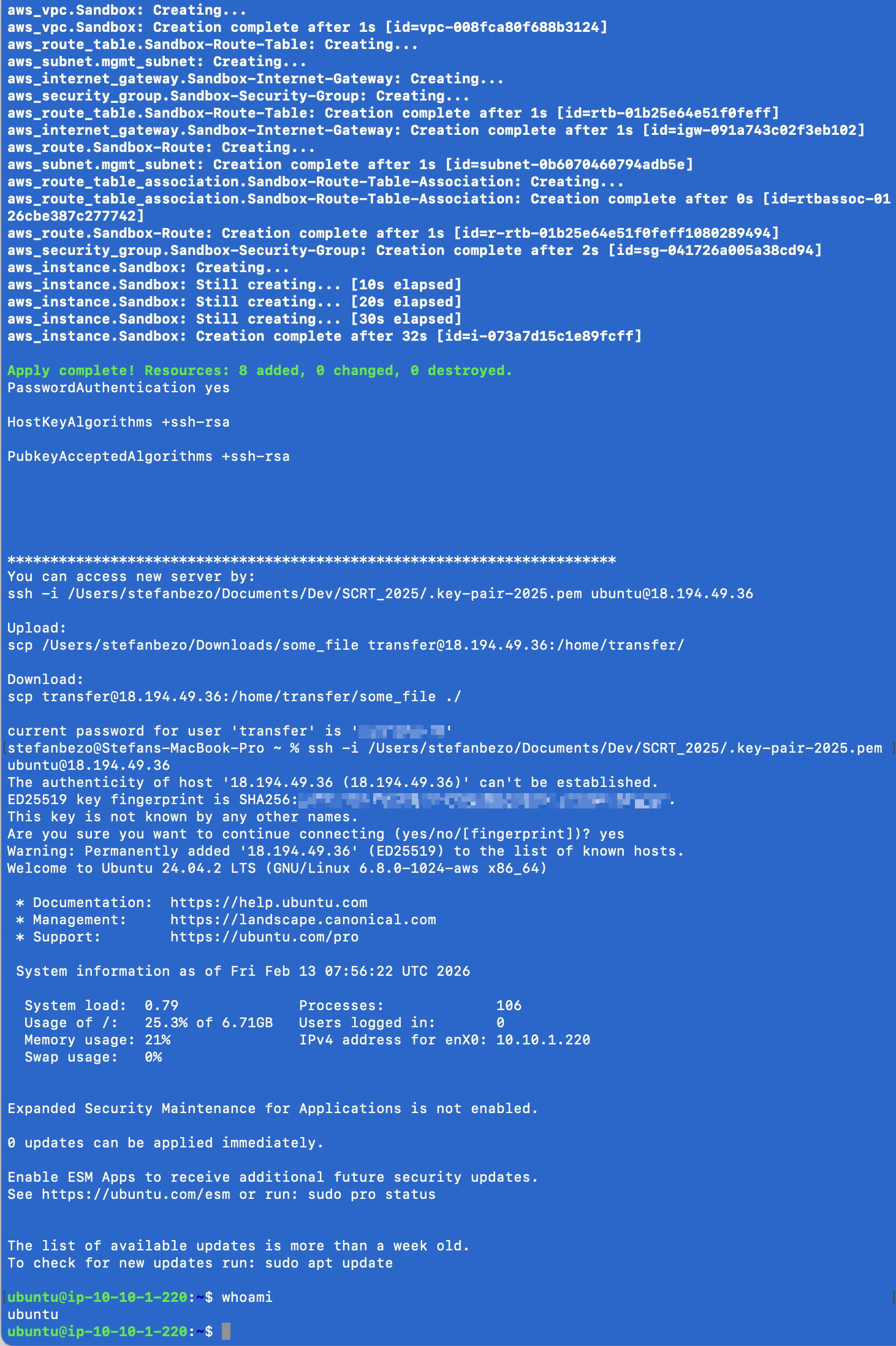
And in less than 30 seconds I get exactly following shell:
Cleanup
Do not forget to create also “terraform destroy” part and use it ! ;)