Issue
If you are reading this post, you are probably already familiar with GitHub Pages and you already tried to publish some static html pages.
One limitation I struggled with for a long time is the fact that GitHub Pages can deploy content from only one branch per repository.
It is usually main branch. But If you want to code something in another branch (say dev) and check result from internet before merging to main, you have a problem.
For a while, I used a workaround where the main branch contained a subdirectory populated from the dev branch. A CI pipeline copied the contents of dev branch into this subfolder on every push, and GitHub Pages then deployed the main branch.
As a result, the repository root served production content, while the development version was accessible under a subpath (for example /dev). Although this somehow worked, it turned out to be fragile and caused several Git-related issues over time.
Solution
Then I’ve found this much more cleaner solution.
- No recursion
- No copying branches into each other
- No merge hell
This is my new perfectly working .github/workflows/deploy.yml file:
name: Multi-Branch Deploy

on:
  push:
    branches:
      - main
      - dev

permissions:
  contents: write

jobs:
  deploy:
    runs-on: ubuntu-latest
    steps:
      - name: Checkout
        uses: actions/checkout@v4

      - name: Deploy to gh-pages
        uses: JamesIves/github-pages-deploy-action@v4
        with:
          branch: gh-pages
          folder: .
          # If push comes from:
          # - main → deploy to site root (/)
          # - dev  → deploy under /dev-auto-folder
          target-folder: ${{ github.ref == 'refs/heads/dev' && 'dev-auto-folder' || '/' }}
This GitHub yml workflow creates new branch “hg-pages”. And this branch should be a new source for deployment.
You should edit source branch for deployment in your GitHub Pages setup of course:
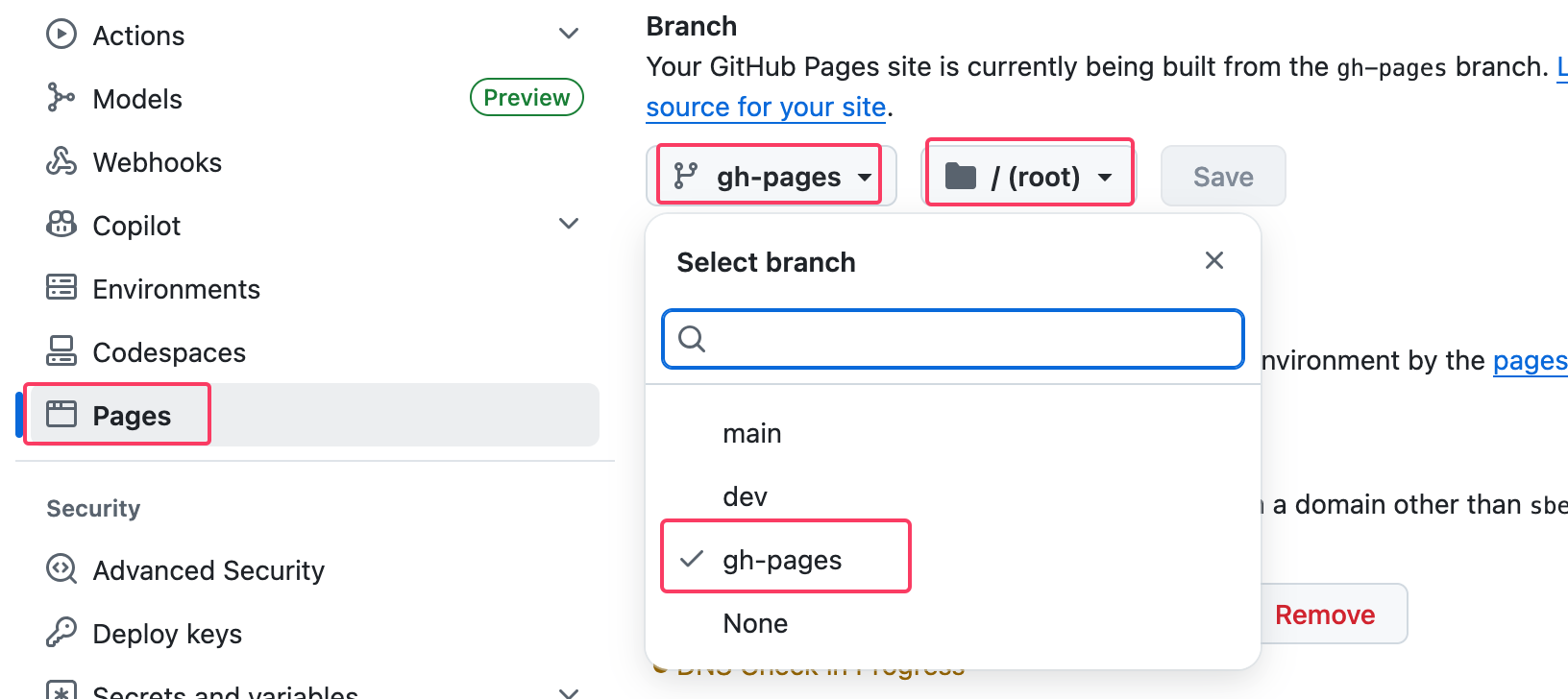
My new deplyment pipeline distinguish between push to dev and main. In case of push to dev it deploys to subfolder dev-auto-folder and in case of push to main it deploys to root folder of gh-pages branch.
Also merging dev to main works like a charm.
Hope this post will help also somebody else;)