This is my second attempt to run a Cisco image in Containerlab. My first try, about two years ago, ended in frustration, so I stayed with Arista and FRR labs for a while.
The reason turned out to be very simple: I had missed one important note on the Containerlab IOS XRd page. Only the control plane version of IOS XRd is supported.
So the working image is this one:
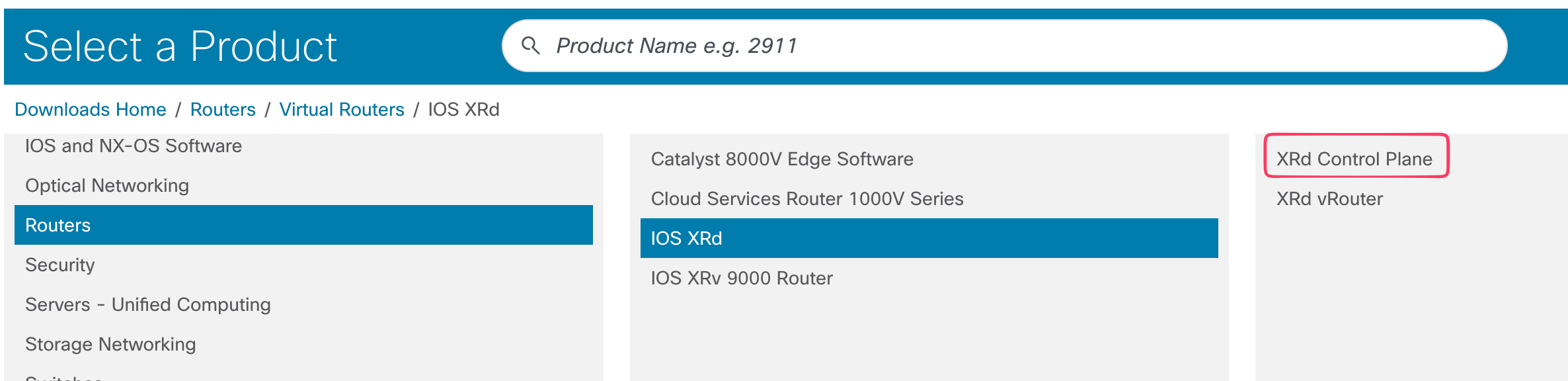
Once I used the correct image, the rest was surprisingly smooth.
Automation first
I like to automate even small labs, so I built the environment like this:
- Terraform to deploy a remote Ubuntu VM
- Ansible to install required packages and prepare the host
- Ansible again to copy lab topologies and perform basic lab operations
IOS XRd needs an x86 platform, so running the lab on a remote Ubuntu VM worked well for me.
All files are available here: ContainerLab-2026
First lab
Because IOS XRd is aimed at service provider use cases, my first test was a small MPLS topology:
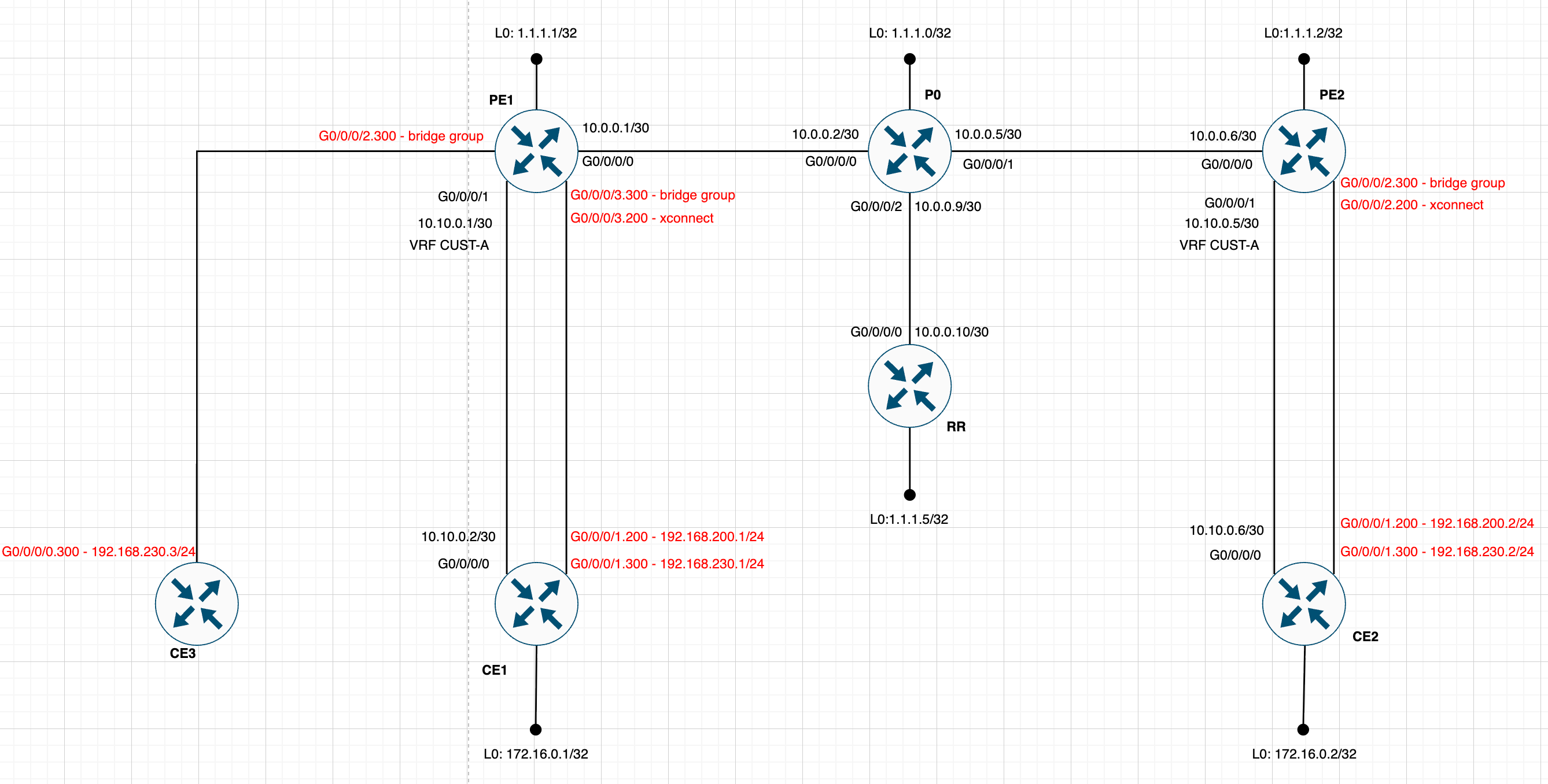
And the corresponding Containerlab topology file looks like this:
name: xrd-lab

topology:
  kinds:
    cisco_xrd:
      image: ios-xr/xrd-control-plane:25.4.1
      env:
        CLAB_MGMT_VRF: Mgmt-intf

  nodes:
    P0:
      kind: cisco_xrd
      mgmt-ipv4: 172.20.20.30
      ports:
        - "2310:22"

    PE1:
      kind: cisco_xrd
      mgmt-ipv4: 172.20.20.31
      ports:
        - "2311:22"

    PE2:
      kind: cisco_xrd
      mgmt-ipv4: 172.20.20.32
      ports:
        - "2312:22"

    CE1:
      kind: cisco_xrd
      mgmt-ipv4: 172.20.20.33
      ports:
        - "2313:22"

    CE2:
      kind: cisco_xrd
      mgmt-ipv4: 172.20.20.34
      ports:
        - "2314:22"

    RR:
      kind: cisco_xrd
      mgmt-ipv4: 172.20.20.35
      ports:
        - "2315:22"

    CE3:
      kind: cisco_xrd
      mgmt-ipv4: 172.20.20.36
      ports:
        - "2316:22"


  links:
    - endpoints: ["CE1:Gi0-0-0-0", "PE1:Gi0-0-0-1"]
    - endpoints: ["PE1:Gi0-0-0-0", "P0:Gi0-0-0-0"]
    - endpoints: ["P0:Gi0-0-0-1", "PE2:Gi0-0-0-0"]
    - endpoints: ["PE2:Gi0-0-0-1", "CE2:Gi0-0-0-0"]
    - endpoints: ["P0:Gi0-0-0-2", "RR:Gi0-0-0-0"]
    - endpoints: ["CE3:Gi0-0-0-0", "PE1:Gi0-0-0-2"]
    - endpoints: ["PE1:Gi0-0-0-3", "CE1:Gi0-0-0-1"]
    - endpoints: ["PE2:Gi0-0-0-2", "CE2:Gi0-0-0-1"]
That is really all it took to get started. If you are trying IOS XRd in Containerlab for the first time, the main thing to remember is simple: use the control plane image, not the full variant.
For me, that one overlooked detail made the difference between a failed experiment and a very usable Cisco lab.
I love containers and I love also Containerlab now :)