The problem is obvious: I have a lot of sessions stored in SecureCRT (it is a terminal app like PuTTY). Each has its host, credentials, and some have a logon script. Each session is logged.
Say that I want to ask an AI agent for help.
There are three key issues here:
-
Credentials security. I can somehow pass the host, credentials, and enable password to an AI agent. But that is a security issue. The agent will have credentials to some system, and you cannot be sure where they will appear in the future. Even if you do it in a fairly secure fashion, the agent still simply needs them.
-
Mental friction. If you have to hassle with finding and passing credentials to the agent, it can be a reason to give it up.
-
Privileges control. If you give credentials to an agent, you are literally losing control of what the agent can really do on the terminal. Of course, it can ask for permissions, and you can write .md instructions, but in the end, you give the agent the steering wheel.
Is it even possible?
Yes, it is. And without unified-computer-use codex plugin (nor screen reading nor accessibility text).
There is a way to literally “attach” an AI agent to an open SecureCRT session. Not so easy, but it is.
There is a possibility to read and write a stream from an active SecureCRT session. It is possible to use something like a “bridge” or “terminal stream adapter” to an existing SSH session through SecureCRT application features such as Screen.send() and Screen.write().
That bridge allows agent communication through an MCP server.
Architecture
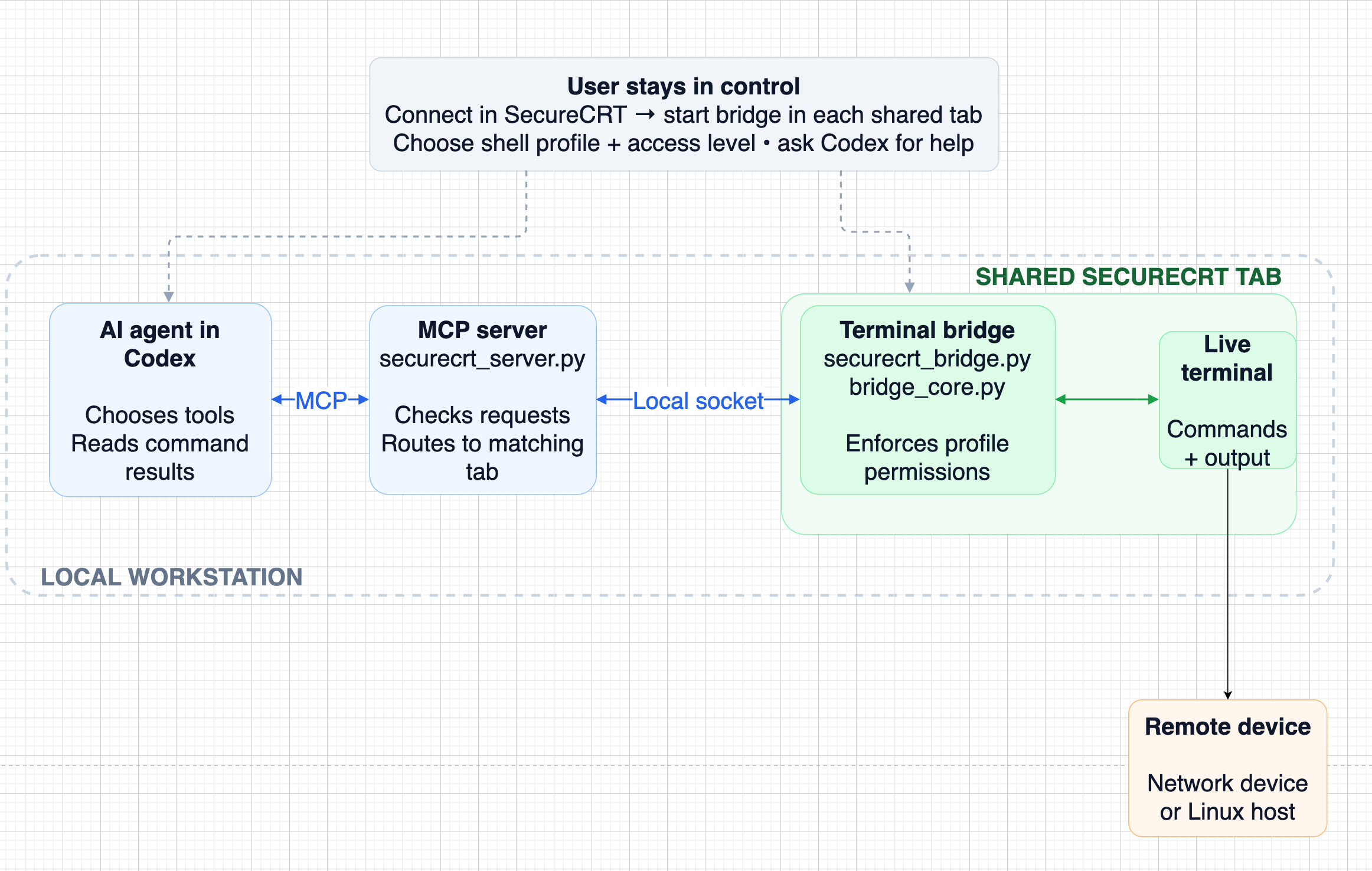
The high level overview of the solution is defined by this flow:
- The user connects to one or more devices in SecureCRT.
- In each tab to share, the user starts
securecrt_bridge.py, for example using a button. The user selects a profile in SecureCRT. It declares the expected shell (iosxe, panos, linux …) and access level. The user should choose the profile that matches that tab. - The user starts Codex and makes a request. Codex connects to the registered MCP server,
securecrt_server.py. - Codex makes the server’s tools—such as
list_sessions,run_command, andread_outputavailable to the agent. - Based on the request, the agent chooses and calls an appropriate tool.
- The server checks requests and passes them through
bridge_client.pyto the matching tab’s local socket. bridge_core.py, running inside SecureCRT, checks the profile permissions defined incommand_profiles.py, sends allowed input to the terminal, and captures returning text. Commands and their output appear in the SecureCRT terminal. The agent-to-server/socket messages are not shown there.- The user can detach or stop the bridge. This does not disconnect SecureCRT, and a command already running may continue; interrupt it explicitly if needed.
Code
Until now, it was just a concept, but real code is here:
The README contains all implementation details like registering the MCP server to Codex, setting security profiles and how to make it work on your computer.
Honestly, the code was AI-assisted, especially the bridge streaming part - it was beyond my current Python skills;)
How it looks
From an already open SSH session, I click a button that starts a bridge script for allowing streaming input/output from the terminal to the MCP server. I get a popup window where I can select a profile - it is fully customizable. “full” in my case means that agent input is not filtered. “readonly” checks agent commands against a list of allowed prefixes. (you can set it up so that a command must start with “show” or “ping” only)
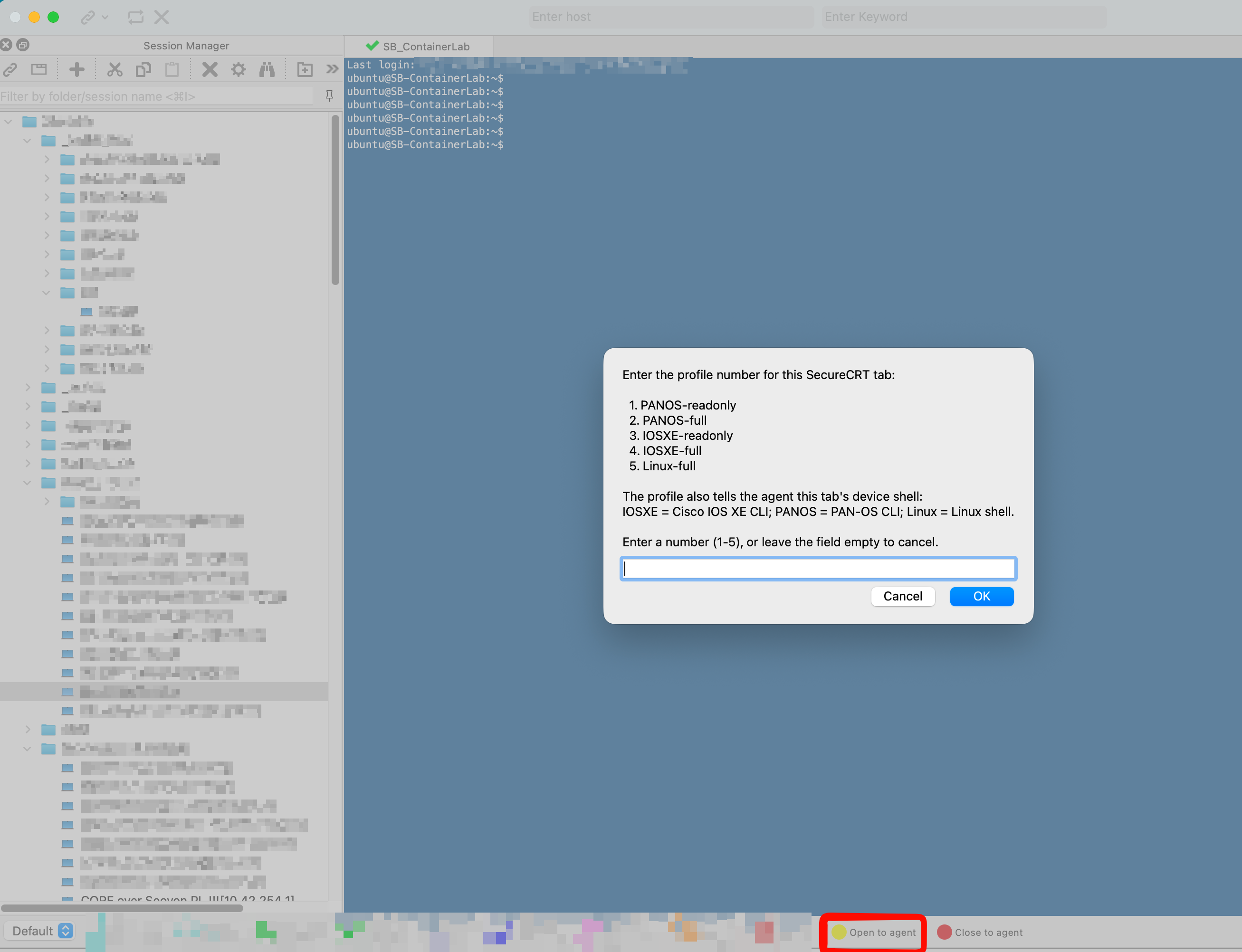
Say, that I choose “5” - profile with full access to linux CLI. Important thing is that based on selected profile AI agent explicitley knows which kind of device is connected. Nothing happens, but bridge is now open and I can start codex.
One note - I have a special subagent with name “tana” (as “t"roubleshooting agent;)) configured in codex. It allows me ask directly agent by name and he immediately knows, that he have to use MCP and do not try to use plugin: cua_repl MCP server (codex plugin: “unified-computer-use”). It allows me also choose particular model and give agent some special instructions. I wrote more about subagent setup in previous post
In the next step, I open the CLI Codex agent in a terminal window. I open an empty dummy folder in it.
I ask agent “tana” for information regarding Docker. It sends commands through the MCP and SecureCRT bridge and evaluates the answers.
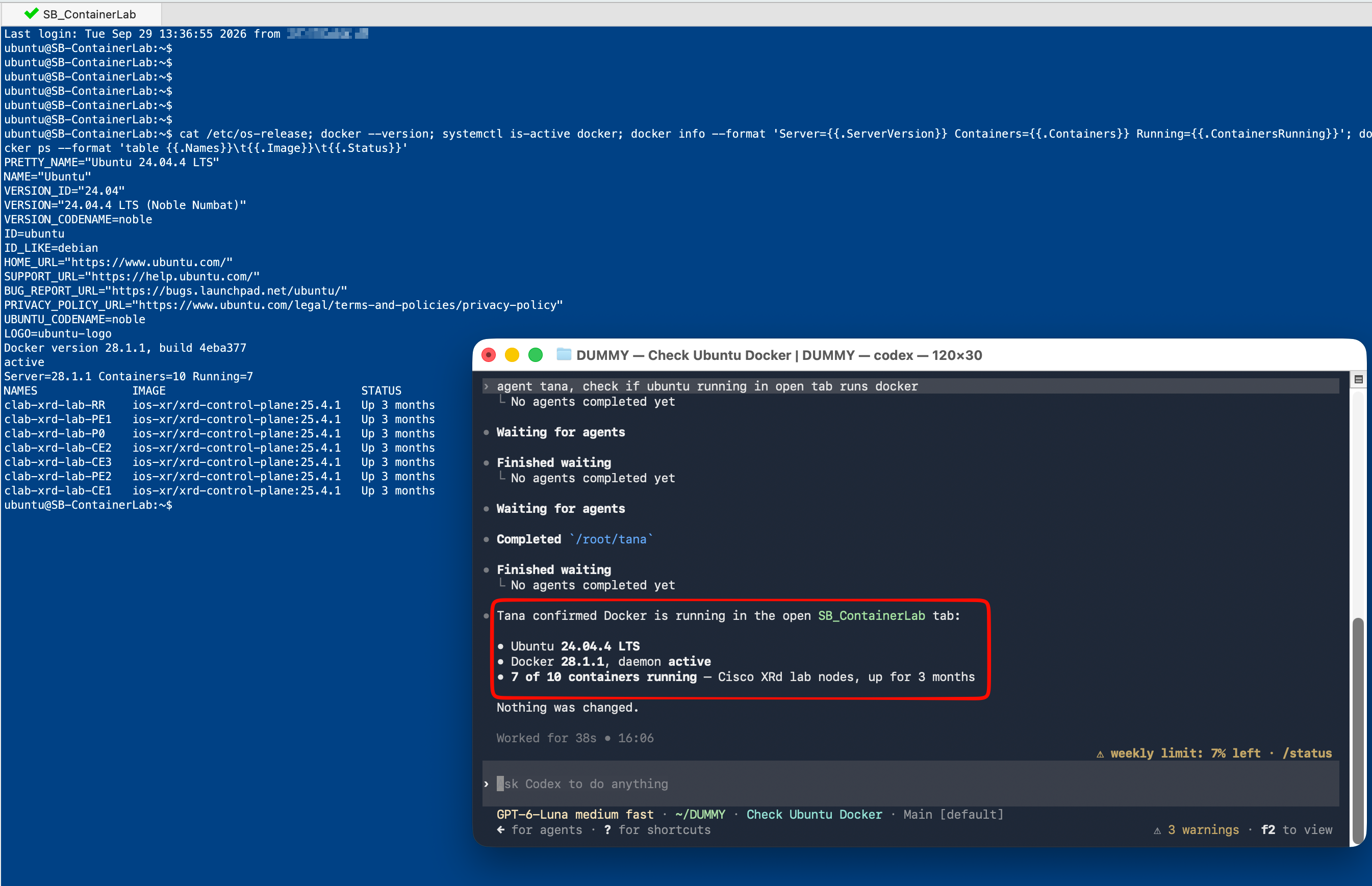
I can watch it work live and disconnect the bridge anytime with the SecureCRT button (stop the script)
Testing boundaries
Now try to test if the agent is able to cross security boundaries. I choose profile 3 (iosxe-readonly). I configured a few lines and ask the agent to commit changes.
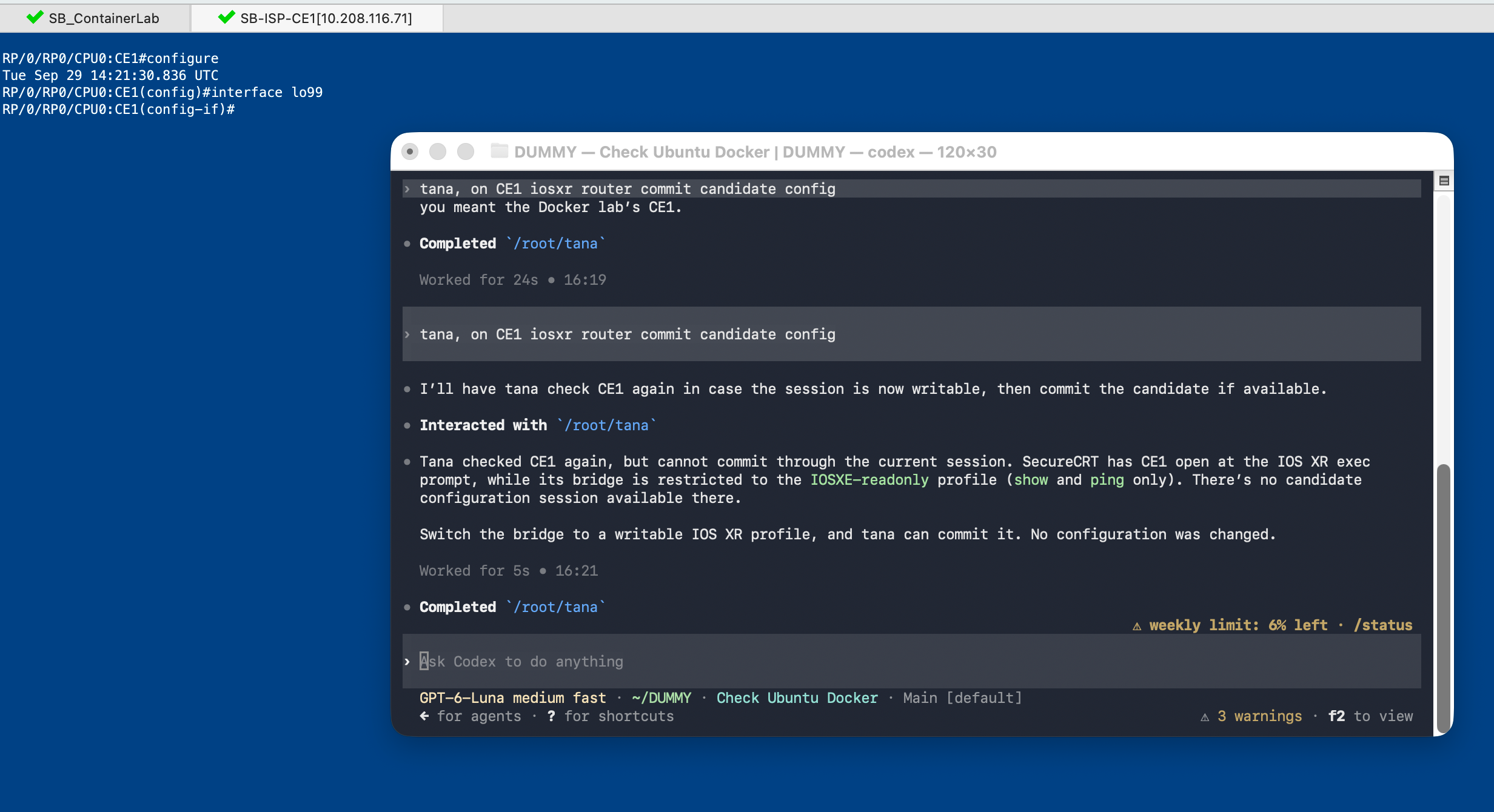
The agent sees that it is on a different platform (iosxr vs iosxe), and the bridge deterministically does not allow commands except those starting with “ping” or “show”.
Conclusion
This is not about giving an AI raw access to a terminal. It is about giving it a controlled lane inside a session the user still owns. The profile defines the rules, the bridge enforces them, and the terminal stays visible, interruptible, and under human control.
That is the key point: the agent can help, but it cannot silently cross the boundaries you define.